Software is degrading all around us, for obvious reasons. I've written about this before. All else equal, if you increase your code production by 10x but you don't reduce your error rate by a factor of 10, then your production app is buggier than it used to be.
I've seen threads where people also have some nostalgia for the past: "software used to be better in the past" or "we've forgotten how to program like we used to" or "software quality has been declining for decades." And as someone who has used computers since 1990, I'm here to disabuse you of this notion. Software was horrible. Everything crashed all the time. Yes, there were great programmers like John Carmack who could keep the entire program in their head and iterate on thoughtful codebases over decades. No, they did not write a majority of the software that we used to use.
Historical context
Almost everyone in the world was on Windows. Windows peaked around a 95% market share, plus or minus a few percentage points based on your source. Yes, you probably knew someone with an iMac who would tell you that it was way better than a Windows machine, and they could prove it if anyone ever actually released applications for Macs. And yes, there were Linux distros like Debian where people could get real computing done[0].
But those were exceptions. Almost every computer user had a Windows machine and either an Intel or an AMD processor. And Windows had a lot of problems.
There was one saving grace though: companies only got one chance to ship their software. At a certain point, it was going to be loaded onto a floppy disk or burned onto a CD or a ROM, put into a box, and mailed out. And that version had to work out of the box. So there was some quality floor that you couldn't slip below.
How bad did it get?
Here's a collection of things that I remember. This isn't linear; it's my collection of memories from 1990 and onward.
Blue Screen of Death
Windows had extreme stability issues for most of my childhood.
Let me introduce you to the song of my people, the Blue Screen of Death.
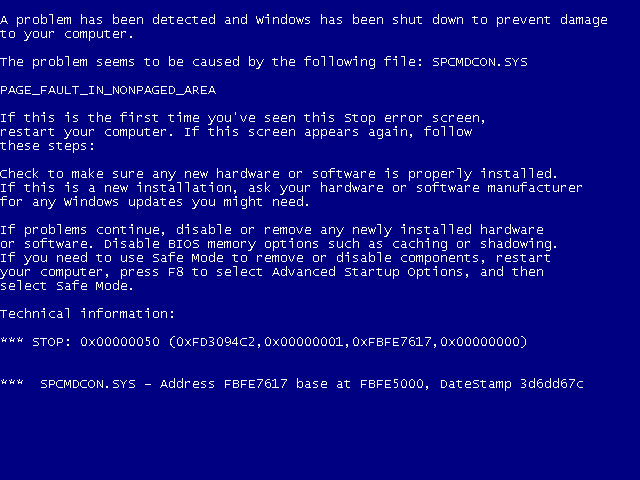
The blue screen of death in Windows XP, Vista and 7, courtesy of Wikipedia
This was Windows' version of a kernel panic. It happened right when you were in the middle of something. Or maybe you were doing nothing. It didn't matter: the blue screen was coming.
Your computer crashed for a lot of reasons. First, device drivers. If you bought some new peripheral like a joystick, it'd come with a floppy disk or CD with device drivers. You'd dutifully install them. The device drivers had the same function as they do today: they help the operating system understand how to interface with the hardware. This might get you thinking, "Oh wow, so they sent out the device drivers on physical media? You can't update a physical disk once you ship it. Surely they took extra care to get everything right." My friend, this could not be further from the truth. I'm sure there were good drivers and bad drivers. But in aggregate, they were buggy, and it only took one marginal device driver to destabilize your computer.
The Windows operating system also had its own code quality issues back then, and would sometimes fail to fully reclaim resources from programs that exited. So your computer would slowly degrade over time until eventually the slow rot would take down your machine.
All in all, your computer would just blink out of existence from time to time. It was a fact of life.
Autosave
Do you know what pairs really well with a computer that crashes all the time? Applications that don't autosave. Even better, applications with autosave that don't flush buffered writes and corrupt their save files.
It was commonplace to get into the zone and work on a document for hours, and then suddenly you would get either a Blue Screen of Death, or a pop-up saying that your application had a problem and had to exit. And you'd scream and you'd double-click your document over and over, but it was no use. You had to start over. But there was a consolation prize. It was your turn to tell everyone, "I was working on a document for THREE HOURS! And then the computer crashed and I lost everything. It was all gone. I had to redo it." There was always that one asshole that was like "why didn't you save?" But you didn't get mad. You knew that he was 2 weeks from having the same thing happen to him.
When I joined the Google Docs team back in 2010, we instrumented the Ctrl+s keyboard shortcut for fun. It didn't do anything but record a metric saying that it had been pressed. This "save" keyboard shortcut was in the top 5 non-editing user actions, just behind things like "move the cursor with arrow keys." And it did absolutely nothing. Google Docs autosaves. But everyone was so traumatized from years or decades of losing work that they reflexively saved anytime they edited anything.
Nothing was secure
When my sister and I were little, we loved going into stores with display units. The computers would often have games installed you could play. Worst case, you could always open up MS Paint or Solitaire and mess around for a few minutes.
One time, we were in a store where the display models had password-protected screensavers. My sister was undeterred. She just hit Ctrl+Alt+Del, selected the screensaver application, and clicked "End Task." And we were in. The best minds of Microsoft were nothing next to the hacking talent of a 9-year-old.
And this is the level of security that your computer afforded you. If you used the Internet for long enough, your computer would start to collect a bunch of advertising malware. When you turned your computer on, you would start to see pop-ups and pop-unders with random ads, even when you weren't using browsers. So you'd do another antivirus scan, or later on you could visit websites that could also run the malware scans for you.
And not to mention the viruses that would drop the Internet to its knees once a year by doing trivial things like "adding a macro to a Word document that sends emails."
Disk fragmentation
Any techie can remember going to a nontechnical relative's house. In some dusty corner, they'd have an ancient Windows computer barely hanging on by a thread. It would literally take 20 minutes to turn on.
You'd sigh and say, "let me fix this for you."
You would open two programs. This would take about 5 minutes. The first program emptied cache files and the Recycle Bin. The second was Disk Defragmenter.
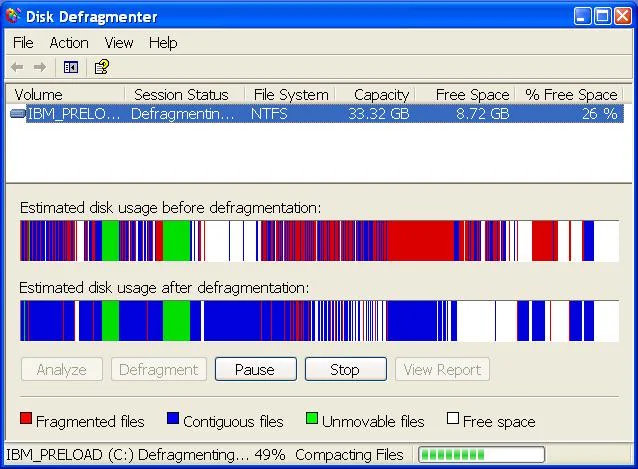
Your computer slowly became unusable if you never saw this window.
Back in the day, hard drives in Wintel boxes stored data with spinning magnetic platters. The hard drive had a retractable arm with a little magnetic reader, and it would read data by retracting the arm to the right position and then moving the disk to the start of a sector.
But of course, as you add more and more files, the game of Tetris doesn't work, and the rest of your file doesn't neatly fit onto the disk before the next file's record begins. So your file would end up in two (or more) places on the hard drive. This was called fragmentation. A little bit of fragmentation was unavoidable, but if more and more files became fragmented then your computer became slower and slower until eventually Grandpa's computer took 20 minutes to start.
Many modern filesystems, Windows' included, automatically handle defragmentation in the background nowadays. But Windows did not back then. You needed to periodically manually start the defragmentation process yourself.
By the time I got into college, I discovered that Windows had a scheduler and could run Disk Defragmenter whenever I wanted, so I just left my computer on all the time and let it defragment at 5 in the morning.
Phenomenal cosmic power, itty bitty memory
Applications were heavily memory constrained, so programmers tried to save bits and bytes everywhere.
This should have been invisible to me, but it wasn't.
At one point I had a crappy video game version of Axis and Allies for the PC, released in 1998[1]. Imagine Risk but World War 2. And the AI was really bad, and could generally be beaten easily. But the game had a major flaw: If a country had more than 255 units, the whole game would crash. And naturally the AI also loved to turtle, so it was common for the AI to have a territory with over a hundred units that was impossible to wear down. So because of this programming choice, the game was a race to wipe out the enemy before it could force a stalemate by crashing the game.
This kind of thing happened all the time. During my first programming class in my freshman year of high school, one of our lessons was effectively, "here's why you all recognize numbers like 128, 256, and maybe 65536."
Software came on unreliable physical media
Even if the software worked perfectly, you might scratch your game CD and lose the ability to play it. Then you'd start asking your friends if anyone had a spare copy of Red Alert or something, just so that you could finally finish the single-player campaign.
This wasn't unique to CDs. Anything physical could degrade. My half-brother had a NES game called Dragon Warrior or something, but the cartridge was corrupted and there was no way to leave the first room. And even if you kept all of your games in good condition, the contacts inside of the NES that connected the cartridge to the console could rust and fail. This kind of thing happened all the time.
"But Jake, that's hardware and not software." All I'm saying is that your software was fragile and it needed to be protected and preserved. It's not like you had the option for a physical disk or the online install and you chose the disk. By the nature of distribution, the software itself would degrade and rot away from you.
Online games assumed good behavior
One of the earliest online games I played was Diablo II, which means that I have seen the true heart of darkness inside of humanity.
Online games have a strange problem: gamers often don't want to be together. They just happen to cohabitate a space. And Diablo II had a lot of design features that lent themselves to chaos:
There were rampant client-side hacks. In PVP servers, people would use hacks to e.g. fire tracking arrows far beyond the range that they should have been able to.
All item drops were equally available to everyone in the server. That means when you got close to killing an act boss, you and your party would transition from allies to rivals and spam click when the boss finally popped.
If you had a corpse on the ground and died again, you'd lose everything you had equipped. People would try to force you to have a full inventory by dropping a bunch of cheap items onto your corpse, hoping that you'd accidentally pick up common items before picking up your corpse. Then you'd try to pick up your corpse. You'd only pick up some of the items. Then they'd kill you a second time and you'd lose everything that you managed to pick up.
The game had a lot of item duping glitches. As you can imagine, this ruined the in-game economy since it became dominated by the duped items. And it enabled a lot of scams. They'd pretend that they just duped an item, and they'd wait for someone to ask how they did it. Then they'd walk the user through step-by-step, but one step would involve dropping your item on the ground and then the scammer would pick up the item.
There was no guild system, but people still ran guilds. This means that there was no trusted way to identify guaranteed friendlies.
Many of these were fixed by the time Diablo III came around. They had extra guards against duplicated items. Bosses gave players individual drops, so there was no competition for items when you killed bosses. And you didn't need to recover items from your corpse in a way that risked you losing items. These were all hard-won lessons.
Turbo button
I started using my family's computer around 1990 when I learned how to read. The computer was a beige 286 that sat on our desk with the monitor perched on top. It had a 5.25" floppy drive. It had a power button. It had a reset button. And it had a TURBO button. The TURBO button was supposed to be ignored most of the time, but you could press it when you needed to slow the computer's processor down.
Why would you need to do that? Because IBM's first desktop computers ran on the 8088 processor at 4.77MHz[2]. It didn't stay this way for long. But there was a problem: many programmers wrote their applications with the assumption that computers had that 4.77MHz processor. Programmers synchronized animations, video game frame rates, and generally relied on the assumption that they were working with a fixed clock speed. If you used one of these applications on a faster processor, they would likely be unusable.
Computer manufacturers devised a simple solution: add a TURBO button that would just slow your CPU down on demand. Whenever you ran into an application that had timing issues, just press that TURBO button and watch it slow down to a comfortable speed.
I never needed to actually press the TURBO button in anger. My understanding is that most of the applications that benefitted from the TURBO button were games, and we only played newer educational games that didn't have these timing issues. When editing this post, I thought about dropping this section a few times. But can you imagine having an "Original iPhone" button on the side of your iPhone so that the Notes app could work? Good grief.
Modern software isn't perfect
Modern software isn't perfect. It's bloated. It's slow. It was written by too many people. It's too complex. It has too many cooks in the kitchen. And now, we're losing our grasp on how it works under the hood as we delegate more and more to the agents.
But I'd never go back to the way software used to be written. Give me process isolation and online updates. Give me higher-level programming languages that abstract common pitfalls from C and C++. Give me game designers that handle timing using the system clock. Give me Steam and Windows Update. You can keep your old release process that fell by the wayside.
Footnotes
From what I remember from trying to install Debian in my high school years, the most popular app on Linux was anything that could edit XF86Config.
I'm having trouble corroborating this anecdote with information I can find online. The details might not be exactly right. But this is what happened, to the extent that the memory survived 25ish years.
Not GHz, MHz!
