Blog posts

Software may be getting worse, but it used to be horrible

Software is degrading all around us, for obvious reasons. I've written about this before. All else equal, if you increase your code production by 10x but you don't reduce your error rate by a factor of 10, then your production app is buggier than it used to be.

I've seen threads where people also have some nostalgia for the past: "software used to be better in the past" or "we've forgotten how to program like we used to" or "software quality has been declining for decades." And as someone who has used computers since 1990, I'm here to disabuse you of this notion. Software was horrible. Everything crashed all the time. Yes, there were great programmers like John Carmack who could keep the entire program in their head and iterate on thoughtful codebases over decades. No, they did not write a majority of the software that we used to use.

Historical context

Almost everyone in the world was on Windows. Windows peaked around a 95% market share, plus or minus a few percentage points based on your source. Yes, you probably knew someone with an iMac who would tell you that it was way better than a Windows machine, and they could prove it if anyone ever actually released applications for Macs. And yes, there were Linux distros like Debian where people could get real computing done[0].

But those were exceptions. Almost every computer user had a Windows machine and either an Intel or an AMD processor. And Windows had a lot of problems.

There was one saving grace though: companies only got one chance to ship their software. At a certain point, it was going to be loaded onto a floppy disk or burned onto a CD or a ROM, put into a box, and mailed out. And that version had to work out of the box. So there was some quality floor that you couldn't slip below.

How bad did it get?

Here's a collection of things that I remember. This isn't linear; it's my collection of memories from 1990 and onward.

Blue Screen of Death

Windows had extreme stability issues for most of my childhood.

Let me introduce you to the song of my people, the Blue Screen of Death.
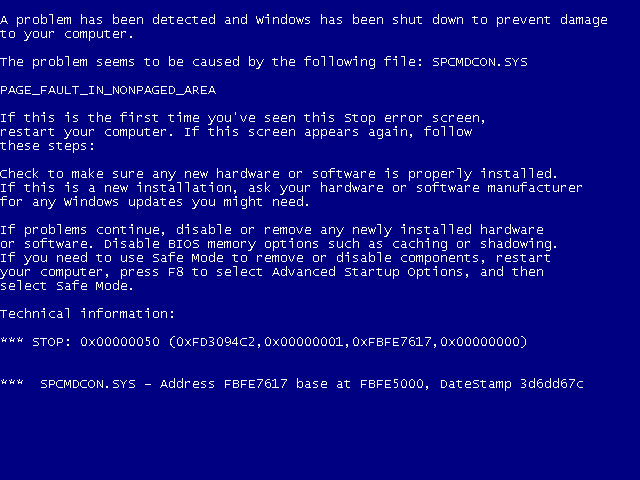
The blue screen of death in Windows XP, Vista and 7, courtesy of Wikipedia

This was Windows' version of a kernel panic. It happened right when you were in the middle of something. Or maybe you were doing nothing. It didn't matter: the blue screen was coming.

Your computer crashed for a lot of reasons. First, device drivers. If you bought some new peripheral like a joystick, it'd come with a floppy disk or CD with device drivers. You'd dutifully install them. The device drivers had the same function as they do today: they help the operating system understand how to interface with the hardware. This might get you thinking, "Oh wow, so they sent out the device drivers on physical media? You can't update a physical disk once you ship it. Surely they took extra care to get everything right." My friend, this could not be further from the truth. I'm sure there were good drivers and bad drivers. But in aggregate, they were buggy, and it only took one marginal device driver to destabilize your computer.

The Windows operating system also had its own code quality issues back then, and would sometimes fail to fully reclaim resources from programs that exited. So your computer would slowly degrade over time until eventually the slow rot would take down your machine.

All in all, your computer would just blink out of existence from time to time. It was a fact of life.

Autosave

Do you know what pairs really well with a computer that crashes all the time? Applications that don't autosave. Even better, applications with autosave that don't flush buffered writes and corrupt their save files.

It was commonplace to get into the zone and work on a document for hours, and then suddenly you would get either a Blue Screen of Death, or a pop-up saying that your application had a problem and had to exit. And you'd scream and you'd double-click your document over and over, but it was no use. You had to start over. But there was a consolation prize. It was your turn to tell everyone, "I was working on a document for THREE HOURS! And then the computer crashed and I lost everything. It was all gone. I had to redo it." There was always that one asshole that was like "why didn't you save?" But you didn't get mad. You knew that he was 2 weeks from having the same thing happen to him.

When I joined the Google Docs team back in 2010, we instrumented the Ctrl+s keyboard shortcut for fun. It didn't do anything but record a metric saying that it had been pressed. This "save" keyboard shortcut was in the top 5 non-editing user actions, just behind things like "move the cursor with arrow keys." And it did absolutely nothing. Google Docs autosaves. But everyone was so traumatized from years or decades of losing work that they reflexively saved anytime they edited anything.

Nothing was secure

When my sister and I were little, we loved going into stores with display units. The computers would often have games installed you could play. Worst case, you could always open up MS Paint or Solitaire and mess around for a few minutes.

One time, we were in a store where the display models had password-protected screensavers. My sister was undeterred. She just hit Ctrl+Alt+Del, selected the screensaver application, and clicked "End Task." And we were in. The best minds of Microsoft were nothing next to the hacking talent of a 9-year-old.

And this is the level of security that your computer afforded you. If you used the Internet for long enough, your computer would start to collect a bunch of advertising malware. When you turned your computer on, you would start to see pop-ups and pop-unders with random ads, even when you weren't using browsers. So you'd do another antivirus scan, or later on you could visit websites that could also run the malware scans for you.

And not to mention the viruses that would drop the Internet to its knees once a year by doing trivial things like "adding a macro to a Word document that sends emails."

Disk fragmentation

Any techie can remember going to a nontechnical relative's house. In some dusty corner, they'd have an ancient Windows computer barely hanging on by a thread. It would literally take 20 minutes to turn on.

You'd sigh and say, "let me fix this for you."

You would open two programs. This would take about 5 minutes. The first program emptied cache files and the Recycle Bin. The second was Disk Defragmenter.
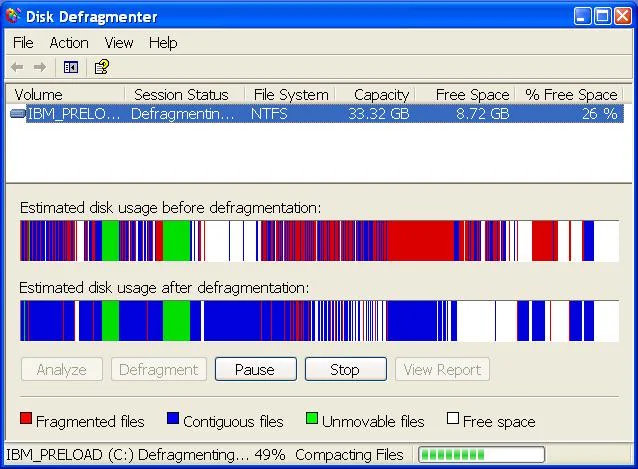
A screenshot of disk defragmenter

Your computer slowly became unusable if you never saw this window.

Back in the day, hard drives in Wintel boxes stored data with spinning magnetic platters. The hard drive had a retractable arm with a little magnetic reader, and it would read data by retracting the arm to the right position and then moving the disk to the start of a sector.

But of course, as you add more and more files, the game of Tetris doesn't work, and the rest of your file doesn't neatly fit onto the disk before the next file's record begins. So your file would end up in two (or more) places on the hard drive. This was called fragmentation. A little bit of fragmentation was unavoidable, but if more and more files became fragmented then your computer became slower and slower until eventually Grandpa's computer took 20 minutes to start.

Many modern filesystems, Windows' included, automatically handle defragmentation in the background nowadays. But Windows did not back then. You needed to periodically manually start the defragmentation process yourself.

By the time I got into college, I discovered that Windows had a scheduler and could run Disk Defragmenter whenever I wanted, so I just left my computer on all the time and let it defragment at 5 in the morning.

Phenomenal cosmic power, itty bitty memory

Applications were heavily memory constrained, so programmers tried to save bits and bytes everywhere.

This should have been invisible to me, but it wasn't.

At one point I had a crappy video game version of Axis and Allies for the PC, released in 1998[1]. Imagine Risk but World War 2. And the AI was really bad, and could generally be beaten easily. But the game had a major flaw: If a country had more than 255 units, the whole game would crash. And naturally the AI also loved to turtle, so it was common for the AI to have a territory with over a hundred units that was impossible to wear down. So because of this programming choice, the game was a race to wipe out the enemy before it could force a stalemate by crashing the game.

This kind of thing happened all the time. During my first programming class in my freshman year of high school, one of our lessons was effectively, "here's why you all recognize numbers like 128, 256, and maybe 65536."

Software came on unreliable physical media

Even if the software worked perfectly, you might scratch your game CD and lose the ability to play it. Then you'd start asking your friends if anyone had a spare copy of Red Alert or something, just so that you could finally finish the single-player campaign.

This wasn't unique to CDs. Anything physical could degrade. My half-brother had a NES game called Dragon Warrior or something, but the cartridge was corrupted and there was no way to leave the first room. And even if you kept all of your games in good condition, the contacts inside of the NES that connected the cartridge to the console could rust and fail. This kind of thing happened all the time.

"But Jake, that's hardware and not software." All I'm saying is that your software was fragile and it needed to be protected and preserved. It's not like you had the option for a physical disk or the online install and you chose the disk. By the nature of distribution, the software itself would degrade and rot away from you.

Online games assumed good behavior

One of the earliest online games I played was Diablo II, which means that I have seen the true heart of darkness inside of humanity.

Online games have a strange problem: gamers often don't want to be together. They just happen to cohabitate a space. And Diablo II had a lot of design features that lent themselves to chaos:

  • There were rampant client-side hacks. In PVP servers, people would use hacks to e.g. fire tracking arrows far beyond the range that they should have been able to.

  • All item drops were equally available to everyone in the server. That means when you got close to killing an act boss, you and your party would transition from allies to rivals and spam click when the boss finally popped.

  • If you had a corpse on the ground and died again, you'd lose everything you had equipped. People would try to force you to have a full inventory by dropping a bunch of cheap items onto your corpse, hoping that you'd accidentally pick up common items before picking up your corpse. Then you'd try to pick up your corpse. You'd only pick up some of the items. Then they'd kill you a second time and you'd lose everything that you managed to pick up.

  • The game had a lot of item duping glitches. As you can imagine, this ruined the in-game economy since it became dominated by the duped items. And it enabled a lot of scams. They'd pretend that they just duped an item, and they'd wait for someone to ask how they did it. Then they'd walk the user through step-by-step, but one step would involve dropping your item on the ground and then the scammer would pick up the item.

  • There was no guild system, but people still ran guilds. This means that there was no trusted way to identify guaranteed friendlies.

Many of these were fixed by the time Diablo III came around. They had extra guards against duplicated items. Bosses gave players individual drops, so there was no competition for items when you killed bosses. And you didn't need to recover items from your corpse in a way that risked you losing items. These were all hard-won lessons.

Turbo button

I started using my family's computer around 1990 when I learned how to read. The computer was a beige 286 that sat on our desk with the monitor perched on top. It had a 5.25" floppy drive. It had a power button. It had a reset button. And it had a TURBO button. The TURBO button was supposed to be ignored most of the time, but you could press it when you needed to slow the computer's processor down.

Why would you need to do that? Because IBM's first desktop computers ran on the 8088 processor at 4.77MHz[2]. It didn't stay this way for long. But there was a problem: many programmers wrote their applications with the assumption that computers had that 4.77MHz processor. Programmers synchronized animations, video game frame rates, and generally relied on the assumption that they were working with a fixed clock speed. If you used one of these applications on a faster processor, they would likely be unusable.

Computer manufacturers devised a simple solution: add a TURBO button that would just slow your CPU down on demand. Whenever you ran into an application that had timing issues, just press that TURBO button and watch it slow down to a comfortable speed.

I never needed to actually press the TURBO button in anger. My understanding is that most of the applications that benefitted from the TURBO button were games, and we only played newer educational games that didn't have these timing issues. When editing this post, I thought about dropping this section a few times. But can you imagine having an "Original iPhone" button on the side of your iPhone so that the Notes app could work? Good grief.

Modern software isn't perfect

Modern software isn't perfect. It's bloated. It's slow. It was written by too many people. It's too complex. It has too many cooks in the kitchen. And now, we're losing our grasp on how it works under the hood as we delegate more and more to the agents.

But I'd never go back to the way software used to be written. Give me process isolation and online updates. Give me higher-level programming languages that abstract common pitfalls from C and C++. Give me game designers that handle timing using the system clock. Give me Steam and Windows Update. You can keep your old release process that fell by the wayside.

Footnotes

[0]

From what I remember from trying to install Debian in my high school years, the most popular app on Linux was anything that could edit XF86Config.

[1]

I'm having trouble corroborating this anecdote with information I can find online. The details might not be exactly right. But this is what happened, to the extent that the memory survived 25ish years.

[2]

Not GHz, MHz!

Bitlog Analytics Leaderboard

Fresh off of patching my VPS and upgrading all of my dependencies this week, I evaluated the state of my site. I checked Google Search Console, and I noticed something funny: Bitlog's homepage was actually getting a bunch of clicks from Google all of a sudden, after 10 years of no real traffic. It turns out there is a site named bitrunlog.com that just launched that allows you to play decompiled games in your browser. But bitlog.com appears at the bottom of the front page of results, so it's getting some small amount of traffic each day.

I have my own vibecoded analytics site for my blog. It has its own domain and everything, and I'm the only user that is permitted to make it through the login flow. It's truly a one-user analytics platform. And immediately after making it, I neglected it. I wasn't getting any traffic, so what was the point? But now that I have some small amount of regular traffic, I'm curious to learn more about it.

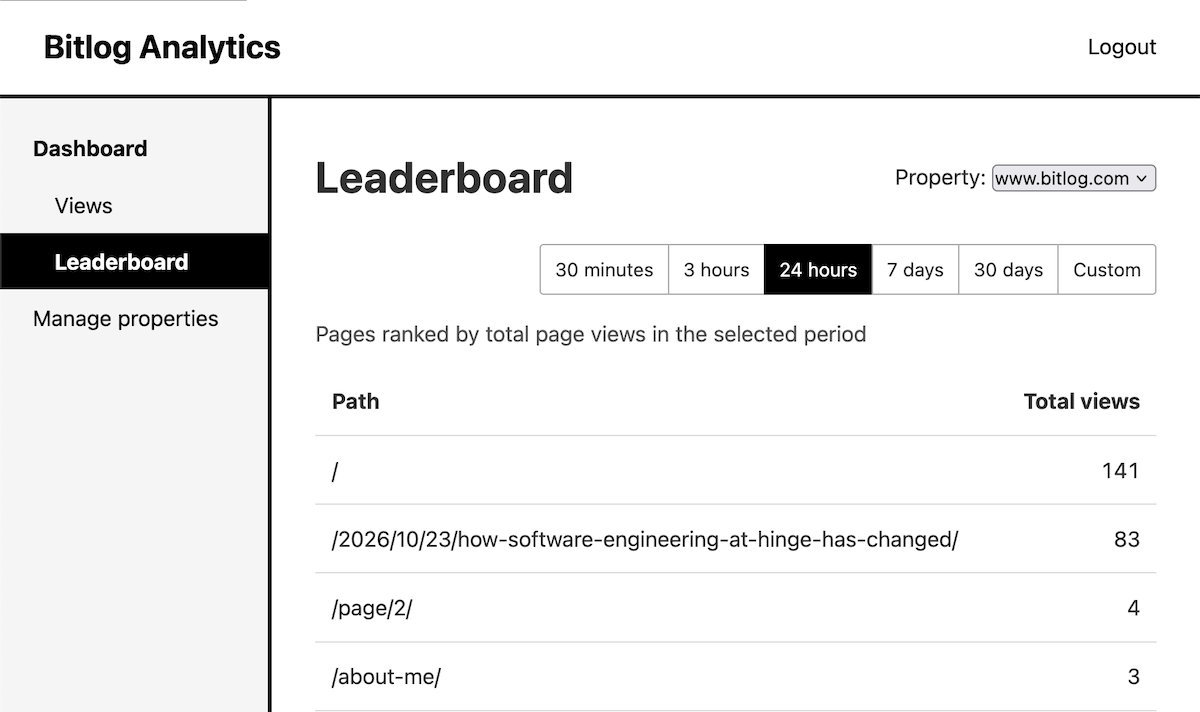
But I was curious recently about what my top posts of all time were, so I dusted off the ol' girl and added support for viewing the page counts over various ranges.

A page on a vibecoded analytics site called "Leaderboard" that shows links and their total views.

My new "leaderboard" view, to see page counts over random periods of time


This was pretty easy since I could just reuse the same endpoint that powers "views" and have the browser just count up all of the totals. I should rewrite it at some point the "correct" way where it has an API endpoint that returns the data in the table, but who has time for that?

And without further ado, my top blog posts since I started tracking data in March are...

  1. Why are we getting worse at software engineering? (2026)

  1. Why are we so bad at software engineering? (2020)

  1. How to cure AI psychosis (2026)

  1. The multi-year process of getting promoted to staff software engineer (2020)

  1. About me (page)

  1. I built my own Google Docs for my blog (2026)

  1. Claude Code is a great Dad side project environment (2026)

  1. How software engineering at Hinge has changed (2026)

  1. DuckDuckGo is good enough for regular use (2020)

  1. We haven't adapted teams to the magic wand yet (2026)

So yeah, a nice mix of old and new content, and really reflects that I've had more energy to blog this year.

How software engineering at Hinge has changed

This was written as part of the Pragmatic Engineer essay contest.

Software engineering has greatly evolved at Hinge over the past few years thanks to recent advances in agentic coding. Every month we incorporate new tools and techniques. We’re accomplishing engineering feats on timeframes that were impossible when I joined Hinge at the beginning of 2023.

The best part is that none of our techniques are complex or complicated. There is no magic. Everything is actionable and repeatable. If you work as a professional software engineer at an app or web company, you can likely adopt most of them. The only barriers are LLM budget, time, and a willingness to own the outcome. Honestly, many of you have probably adopted these, and you probably have your own strategies that you could share with us to make us move even faster. I’d love to hear them!

But first, let’s back up. Hinge is a dating app, and dating apps need humans in the loop. There are many reasons we can’t just hand Hinge over to the machines and go to lunch.

The first reason is taste. Imagine that you’re a software engineer working on tools for software engineers. It wouldn’t surprise me if you built and shipped a small feature within 30 minutes. If the problem were small and the solution were easy to verify, why would you need more time than that? But now imagine that you want to make the app resonate specifically for Gen Z users while still serving all of your existing users. That’s much harder, especially if you are in another demographic. Is there any human on this earth that can “build for themselves” across every national, political, gender, sexuality, and generational divide you can name? Absolutely not. You must work in aggregates. You need to perform a bunch of research. A lot of the research can be collected via surveys, but ultimately, you also need to find ways to interact directly with your audience and incorporate those ways into your process. Skilled designers and product leaders are needed to synthesize this information and propose new features. And you need that human touch and the taste that nails the vibe while straddling all of those lines.

Also, safety is critical to the experience on dating apps. Users tell us things that they might be afraid to tell their own family or declare publicly. So we must remain in control of our app’s experience because the stakes are too high. Ultimately, we recognize that we have ownership of what gets shipped into production, and we act accordingly.

It’s important to contextualize all of our LLM wins: they are done in an environment where there is real human impact, and human judgment still reigns supreme. And the results are really exciting. We have still found massive gains in four areas: prototyping, on-call incident response, tooling, and engineering. Let’s dive into each of these areas and go over specific techniques that have accelerated us.

Prototyping is easier than ever

A year ago, I joined two other recs engineers (and a talented MLE and one plucky user researcher) and together we built a recommender in four days for a hackathon. We vibecoded as hard as we could, we tuned it as hard as we could. Fueled by expertise and memes, we got our prototype over the finish line for second place. It was the seedling for a project that eventually hit production.

Earlier this year, we had another hackathon. I picked another recs project that had comparable backend difficulty to the previous year’s. But there was something different: I teamed up with two talented mobile engineers and I wrote the entire prototype recommender system by myself in three days while the mobile engineers built a custom UI to show it within the app. Good enough for third place, and it also was the seedling for a project that eventually hit production. Yes, this was a step backwards for podium finish, but it was a leap forward in that agents help us accomplish things on timelines that used to be out of reach.

Did I become a superhuman prototyper within a year? No way. The LLMs got better at generating prototypes. And when it’s easy for engineers to generate prototypes, engineers can get more product features into production. The old days are gone. You don’t need to craft an argument that’s so compelling that every person in the company bends their priorities out of the way so that your idea has room to be prioritized. You can just build something and show them, “hey, I think we should do this.” And if it’s good, people will pay attention.

This is happening at Hinge right now. I have done it. Others have done it. You can do it. If you have conviction that something should be built, fire off a prototype while you work.

You can make this an intentional part of your process. At Hinge, we’ve had success with official small teams with a few disciplines. At the beginning of the year, we were doing experimental machine learning model work, but we weren’t sure if we were on the right track. So we created our own Canterbury Tales cast of a Backend Engineer, a Machine Learning Engineer, a User Experience Researcher, and a Product Manager, and we rapidly iterated on prototypes with internal testers until we landed on a successful formula.

This approach has also succeeded outside of my domain of backend recommendations. Another team recently had a lot of success teaming up a Product Manager, Mobile Engineer, and Designer, and they faked the entire backend from the client as they continued to work on a UX-heavy experience.

There’s no right way to do it. Fake the backend for internal prototypes if you’re a frontend engineer. Fake the frontend if you’re a backend engineer. Just get something working and show people.

What happens after the prototype phase? Once the prototypes hit a critical mass of acceptance, they transitioned into more normal projects: Figma designs, Trust and Safety reviews, design docs, implementation sprints, etc. The prototypes are just that: prototypes. We borrow what we can from the prototypes and ensure that the shipped production system is implemented at a high quality.

Bots are helping out with on-call

Here’s a hypothetical incident: You hear a loud noise. Where are you? You’re in bed. Maybe it’ll stop if you don’t move. It’s still going. Then you find your phone and stare at it for a second. You’re being paged. It’s three in the morning. Now you remember all of those responsibilities you have. Right now, the most important one is that you’re on-call. You ACK the page and sit up in bed. You need to find your laptop. You go get it. You log on and go into Slack.

And then you click into @oncall-bot’s thread in the incident channel.

Here, you find a fully-automated attempt at an investigation. A critical service has an elevated gRPC failure rate. @oncall-bot notes that the service’s CPU is much higher than normal and the service hit its autoscaling limit and can no longer spin up new pods. It investigates a bit further. There are new stack traces coming from that endpoint. @oncall-bot examines the stack trace. An experimental feature was recently added in the code paths, and its code branches are taking too long for some users. @oncall-bot can’t figure out why it’s taking so long, though. You ask @oncall-bot to make a pull request to turn the experimental feature off while you double-check everything that it said. It all looks correct. You get an approval from another on-call engineer, you turn the feature off, you make sure the graphs normalize, and you go back to sleep. This is tomorrow’s problem.

We’re only at the beginning of our on-call automation journey, but the results are encouraging. By creating a bot with controlled access to service logs and metrics, and the ability to cross-reference its findings with code, our platform team created a good first responder. @oncall-bot isn’t the smartest bot in the world, but it does the first level of investigation that you’d do anyways. It often gets close enough to the root cause that the rest of the incident management goes much faster. Other times, it doesn’t uncover the issue but still provides a good jumping off point for investigation.

We’re starting to explore more automations like fixing common on-call issues, but we are early in this part of our journey.

Tooling is easier to build than ever

For years, testing out mobile builds at Hinge was an onerous process if you weren’t a mobile engineer. There were two approaches. If you wanted to install Xcode and Android Studio, you could build the app locally on the right branch and then run in an emulator. But many people who needed to test, like QA analysts, weren’t comfortable managing Git and running builds. So we would also publish a build to e.g. TestFlight so that they could test.

Two engineers on our platform team dreamed of a better way. Imagine a Mac app that just listed all of the active branches in both the Android and iOS repositories. In this dream it can automatically install the Android and iOS emulators for you. While we’re writing a wishlist, we’d also add that we could easily publish new builds to it, and it was so easy to use that nontechnical people could use it too.

There was a problem. Neither of them knew Mac development.

OK, I’m kidding. It wasn’t a huge problem because they could lean on LLMs to do the Mac development. They built it. It’s awesome. You double-click a build and the emulator just runs with the right version. Everything is handled behind the scenes for you.

This isn’t the only instance of new tooling cropping up at Hinge. We have a Cambrian explosion of new tools like faster deploy scripts, new ways to test our code, knowledge bases, CLI tools, etc. We had all of these ideas in our head, but we didn’t have enough time to realize them. But now that you can just have an agent chew on it in the background, there isn’t a barrier anymore.

What other problems did we have a few years ago that don’t exist anymore? When I joined, I was given a huge Notion checklist of instructions. Each line of instructions linked to another large Notion page that explained the relevant setup of some small facet of the system. It took a long time and inevitably you’d still lack a permission or three you needed.

Well, those are also the days of the past. Now we have a CLI tool named dev that can set up any number of environments for you. Do you want to program iOS, Android, and backend? Done. What is your LLM of choice and what MCPs do you want to have installed? Done.

It drifts sometimes. Nothing’s perfect. But it’s easy to just point an agent at it and say “fix it.”

We’ve also seen wins from MCP. The most obvious is our notifications platform MCP, which can also be accessed via its corresponding Slack bot. It’s a one-stop shop for notifications use cases. If you’re an engineer that has never worked with notifications, just describe what you need and it’ll explain everything you need to get started. If you want metrics on a running campaign, it can look them up. If you need to investigate why a notification isn’t behaving like you expected, it can help you.

Accelerating design, coding, and reviews

So you’ve researched, you’ve prototyped, you have design mockups, and now you have something that you want to build.

Now the engineering starts.

And this is where there is a devil sitting on your shoulder. He leans over to whisper in your ear. And you already know what he wants to say. “Why can’t you just generate the tech spec from the product spec? And why can’t you just implement the code directly from the product spec? How do you even benefit from the tech spec?”

I’ve personally settled on my own heuristic for whether “slop” writing is acceptable in a particular situation: “Did your org care about this kind of writing before LLMs?” At Hinge, we took a lot of care to craft and write design docs. We wanted to ship good architecture and reasonably good code. We were willing to discuss the docs and iterate towards good solutions.

But on the other hand, little attention was given to commit messages. In fact, I don’t think I’ve ever seen someone asked to rewrite a commit message before it would be approved. So this is reflected in my own work: I make sure the docs are written in my own words, but I let the LLM generate my commit messages. When writing this I feel a lot of conflict from imaginary engineers. “It should all be this one way” or “it should all be another way.” But ultimately I think you need to be pragmatic. Different text fields add different amounts of value. Sometimes it needs to be good enough, and sometimes it’s worth spending extra time to keep revising to get it perfect.

So ultimately, the design docs are all written in my own words, even though they are heavily accelerated by LLMs. I’ve tried everything from “Go straight from description to feature implementation” in hackathons, to “let’s generate the design doc with the LLM and see how it goes,” to “let’s just write the design doc like we used to.” And I find that I get better results when I write the design. I internalize my own designs far better when I produce them in some way instead of just reading them. I think you will find the same thing: taking time to internalize your designs will make you a stronger engineer as you continue to build on your own work in the future. Sometimes you need to slow down a little to go much faster in the long run.

And here’s the cool part: you can have the LLM check your tech spec against the product spec and Slack conversations for drift. You’ll find tons of small drift, where the LLM finds that the product spec and tech spec say one thing, but a Slack conversation indicates that some people believe something else. And every one of those is a potential deadline slip that just got highlighted.

I’ve also found that LLMs are amazing at decomposing design docs into sensible sequenced tickets. I’ve experimented with just having the LLM create all of the backend tickets, and it has worked out. The tickets have enough context that an engineer can easily understand the scope and how it fits into the project. LLMs are also great at picking up these tickets and producing a reasonable first draft.

OK, we have tickets and we’re implementing! And this is where people have their own preferred approaches. LLM coding has ended up a lot like IDEs used to be: everyone has their own distinct styles. Some people love the Superpowers plugin and checking in all the specs, some people love centralized knowledge bases. I personally have my own vibecoded workspace switcher for working on many tickets in parallel.

We also have collaborative ways to work. For example, we have a Slack bot that can author a pull request on your behalf from the surrounding context. We typically use this for small changes that fall out of Slack discussions.

Token spend is capped, but you can easily request more if you provide rationale. The goal is to stop unexpected runaway usage.

There’s no single silver bullet that has made us more efficient. It’s just a collection of lots of small efficiencies. Here’s an example: creating a new service was tedious when I joined Hinge in 2023. It was difficult to understand what pre-existing patterns were modern or obsolete, so you made a lot of judgment calls on the fly trying to pick out the most modern patterns. Then you’d write the Terraform, which had a combination of obsolete or overridden fields that had no side effects, or alternatively seemingly-harmless fields that were unexpectedly important. Typically you’d need several attempts to stand the service up in our development environment, and then several attempts to stand the service up in our production environment, just to work through all of the random configuration issues.

This is completely different when I’m writing this in the second half of 2026. You can simply tell your LLM, “write a new service named servicename. Pattern it after preexistingservice. Connect to serviceone and servicetwo’s gRPC servers, and set up the skeleton of a gRPC service but don’t add any endpoints yet.” and it’ll one-shot it. And then you can go to the Terraform and invoke the relevant skill to create the Terraform for the service. You can just point an agent at both directories and ask it to double-check the work before you send it for review.

In fact, don’t sleep on skills. They are a high leverage way to accelerate your work. We are encoding more and more Hinge-specific functionality into skills and I continue to see it pay off. Here’s another example: today I wanted to test a new set of public-facing endpoints that I’ve been building. So I told my agent to test them with my development user ID. And the agent found a relevant skill for issuing these commands against the dev server. From there the agent understood that it had access to a CLI. This CLI produces tokens that auth the request. And then the skill explained how to find the request format. And before I knew it, the agent had exercised every endpoint and printed a table of results. Then I asked it to exercise the content filter. And good grief, agents can curse with the best of them.

So you’ve written your code, and now you’re ready for code review. But a human isn’t going to read it yet. We have a specialized review agent that should be satisfied before a human reviewer is tasked with looking at the pull request. We liked it for two reasons: first, it has a comparatively low false positive rate. Second, it’s just a legitimately good first-pass review bot. It finds issues that frontier models don’t. It finds issues that the human reviewer doesn’t. But you will also find issues that slip past every single bot. And this is where it’s important that you exercise your own judgment as a human reviewer. Every day, I find problems that the agents miss. The agents can perform incredible feats of engineering, but ultimately they don’t produce the work by themselves. They do this as a way of accelerating you and your organization.

And then when you’re finally finished with coding, I highly recommend running one final consistency check. Prompt your model, “Here are the paths to my backend and client codebases. Here’s the path to the tech spec, read it with the MCP. Here’s the path to the product spec, read it with the MCP. Check MyNewFeature for integration problems between them or inconsistencies between spec and implementation.” It helps find those last issues that would come up in pre-release QA and internal dogfooding.

You can just try things

Hinge has adopted many techniques that have added up to one thing: software engineering is completely unrecognizable from the way it was a few years ago. And there’s a lot of room for more change.

We didn’t adopt everything at once. One feature at a time, we gave them a shot. We tried many techniques and technologies that didn’t work for us. Many sucked for a while until they finally reached a threshold where they became great. But each time you find a working technique, things get a little better, a little faster, or a little safer.

So I really encourage you to keep trying techniques that you hear about. Many have a high skill ceiling and you can get better at them. Many are just distractions that won’t work for you. But the more experience that you get, the more you can differentiate between skills and distractions and continue to improve engineering in your organization.

Thanks to Sammy Spiegel, Jarryd Boyd, Lisa Detig, and Sam Rozenberg for providing feedback on drafts of this essay contest entry.